Up to 600% in Basic
Break past quiet browser tabs. Basic mode caps at 600% — enough for most sites and calls.

Boost any tab up to 600% in Basic mode. Upgrade to Turbo Mode (Boost) for up to 800%, One Click Booster, and sound shaping (EQ).
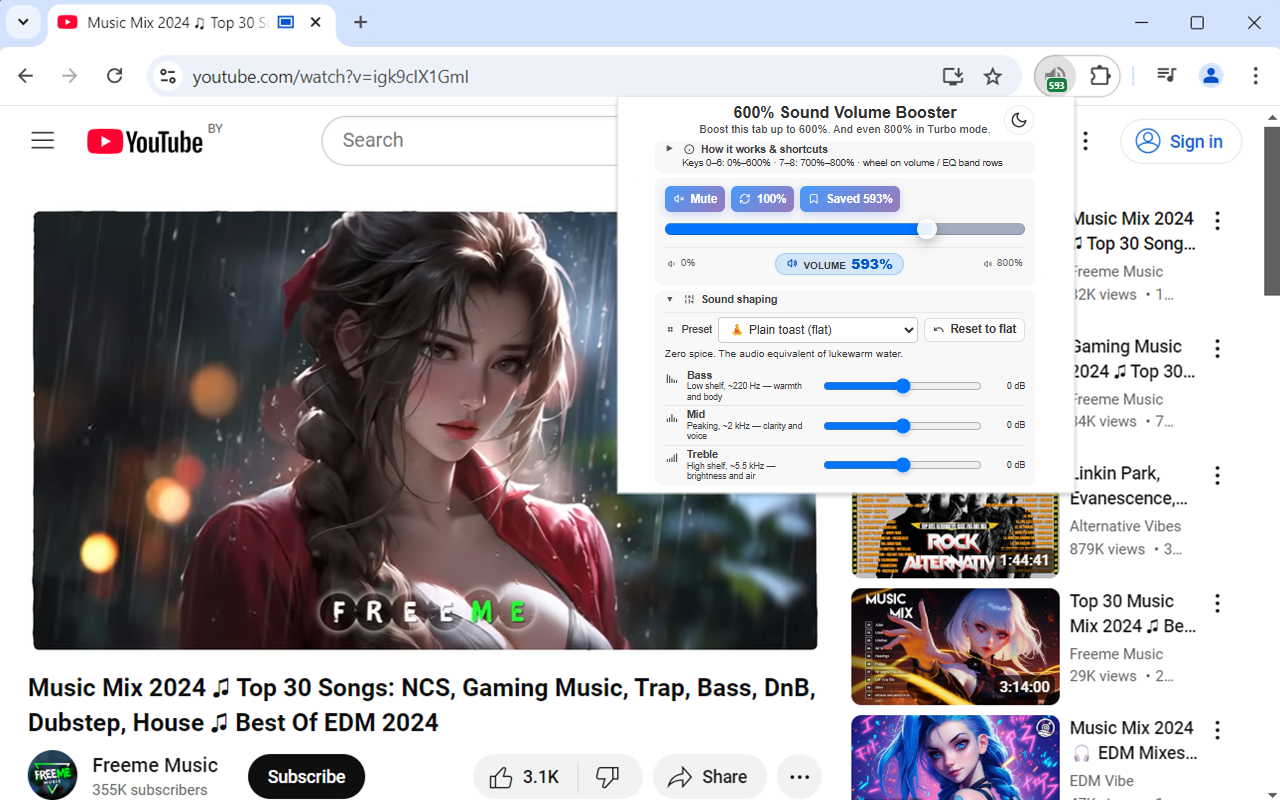
Louder, clearer audio for videos, calls, music, and streams — per tab, without touching system volume.
Break past quiet browser tabs. Basic mode caps at 600% — enough for most sites and calls.
Adjust volume for each tab independently. Switch audible tabs from the popup when needed.
Remember preferred levels for domains and restore them with one tap when you return.
Number keys, arrows, Page Up/Down, and mouse wheel on the volume card for fast adjustments.
Built for Manifest V3 — focused UI, dark/light theme, and minimal overhead.
Works while you watch fullscreen video — boost stays with the tab you care about.
In the extension, Turbo Mode is the paid tier — the same features described under Turbo mode — what you get in the popup. Below is what Turbo unlocks in the shipping product.
One toolbar click reapplies your saved boost when the tab does not match — without opening the popup.
Turbo raises the slider maximum from 600% to 800% for especially quiet streams, calls, and laptop speakers.
Presets plus Bass / Mid / Treble bands — tame crackle on big boosts by shaping peaks instead of only maxing the slider.
Basic mode has no charge. Turbo Mode is optional and billed through the extension’s checkout when paywall is enabled.
7-day Turbo trial (full 800% cap, One Click Booster, EQ) when billing is active.
Subscribe, restore purchases, customer portal, and support links live in the extension footer when the paywall is on.
If you skip Turbo, you keep 600% boosting and core per-tab controls — no subscription required.
Always confirm the amount in checkout — the payment provider may show tax or localized pricing.
Core boosting included · no account required for standard controls
Per-tab volume, shortcuts, saved boost, up to 600%
800% cap · One Click Booster · EQ · optional subscription
7-day trial when billing is enabled, then choose a plan in the extension.
Quick answers about Basic mode, Turbo / Boost, and billing.
Yes. You can boost tabs up to 600%, use per-tab controls, and save levels per site without paying.
Turbo adds a higher cap (800%), One Click Booster from the toolbar, and the sound-shaping EQ section. It is the same “Turbo mode” block documented in the extension UI.
Prices on this page reflect in-extension display strings for planning only. The payment screen is authoritative.
High gain can be harmful. Increase volume gradually, watch for distortion, and see our Terms of Service for the health and safety notice.
Send a message about 600% Sound Volume Booster, Turbo Mode, or billing — we’ll get back as soon as we can.
Install from the Chrome Web Store. For subscriptions, receipts, and in-app support, use Customer portal and Contact support in the extension footer (when billing is enabled). For general questions, email hello@extaddon.site.